Incloud Handwritten Font for Small Business Branding
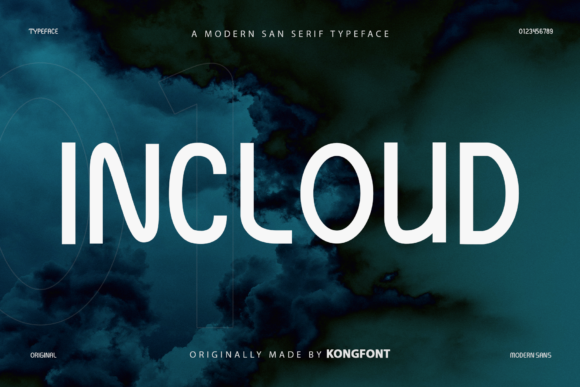
If you’re a small business owner juggling branding, packaging, social media, and customer-facing materials — Incloud is a modern and playful handwritten script font that helps you look intentional, warm, and unmistakably *you*. As one of the most versatile freebies in the fonts category, Incloud delivers personality without sacrificing professionalism — especially when used thoughtfully across real touchpoints like product labels, café menus, Instagram story headers, or handmade soap packaging.
Incloud for Wedding Invitations and Elegant Branding
Incloud brings just the right balance of whimsy and refinement — making it ideal for wedding stationery, boutique bridal shops, or lifestyle coaches launching signature programs. Its flowing, slightly bouncy letterforms feel personal and inviting, not stiff or overly formal. When paired with a clean sans serif (like Montserrat or Inter) for body text, Incloud works beautifully as a display font for “Mr. & Mrs.” headers, monogram accents, or event date lines. Because it’s compatible with Photoshop and Silhouette Design Studio, you can easily layer it onto foil-stamped invites or cut vinyl decals for signage — all while keeping your brand voice consistent from email newsletter to printed keepsake.
Incloud for Handmade Product Labels and Packaging Design
For makers selling candles, bath bombs, honey jars, or artisanal teas, Incloud adds charm and authenticity to product labels without looking generic. Unlike overused script fonts, Incloud has subtle irregularities — slight variations in stroke weight and natural entry/exit strokes — that mimic real handwriting. That means your lavender-scented soy candle doesn’t just say “hand-poured,” it *feels* hand-poured. Use Incloud at 18–24pt on front labels for brand names or flavor descriptors (e.g., “Honey Ginger,” “Midnight Lavender”), then switch to a highly legible sans serif for ingredients and net weight. Since Incloud is part of the freebies collection, it’s an accessible upgrade from default system fonts — but always verify commercial licensing before printing on retail packaging or selling digital templates that include the font.
Incloud for Café Menus and Local Business Signage
Your café’s chalkboard menu or laminated takeout menu is often the first visual impression customers get — and Incloud makes it memorable. Its playfulness fits perfectly with cozy, community-focused brands: think “Oat Milk Latte,” “Seasonal Scone,” or “Brewed Fresh Daily” in soft curves and relaxed spacing. Because Incloud is optimized for tools like Photoshop, you can mock up menu boards digitally before printing, adjust kerning for tighter fit on narrow chalkboard panels, or export crisp PNGs for Instagram Stories. Just avoid using it below 14pt in print or on mobile thumbnails — its decorative nature shines best at medium-to-large sizes where the rhythm and flow stay readable.
Incloud for Social Media Graphics and Instagram Story Headers
When your audience scrolls fast, Incloud helps your posts stand out — not by being loud, but by feeling human. Use it for short, impactful phrases: “New Arrivals,” “Limited Stock,” “Just Dropped,” or “You’re Invited.” Its compatibility with Silhouette Design Studio also means you can quickly adapt Incloud-based designs for printable quote cards, workshop handouts, or digital Canva templates — great if you sell coaching packages or creative courses. Pair Incloud with a neutral sans serif background font to ensure accessibility and readability, especially for captions or alt-text descriptions.
Incloud for Logo Design and Boutique Brand Identity
A logo sets the tone for everything else — and Incloud works well as a primary or secondary logo element for small businesses rooted in craft, wellness, or creativity. Think: a floral design studio, a slow-fashion boutique, or a holistic skincare line. It’s expressive enough to anchor a brand mark, yet restrained enough to scale cleanly to app icons or embroidered tote bags. That said, avoid using Incloud alone for full-word logos if your business name includes complex spelling or uncommon characters — test legibility across devices first. For stronger versatility, combine Incloud with a minimalist sans serif in your full logo lockup (e.g., Incloud for the shop name + Inter Light for the tagline “Handmade in Portland”).
Incloud for Thank-You Cards and Customer-Facing Print Materials
The little things build trust — and a handwritten-style thank-you card signed with Incloud feels more personal than a generic font. Whether you're sending post-purchase notes with online orders, welcome kits for new coaching clients, or seasonal greetings to loyal customers, Incloud adds warmth without veering into childish or unprofessional territory. Since it’s among the most practical freebies in the fonts space, you can confidently use it across multiple print formats — from folded A6 cards to sticker seals on kraft mailers — as long as your license permits commercial use. Always download the official version directly from the source to ensure full character support and proper OpenType features.
How to Test Incloud Before Committing Across Your Brand
- Open Photoshop or Silhouette Design Studio and type your business name, tagline, and one product descriptor using Incloud.
- Print a sample label at actual size — does it hold up on matte paper or kraft sticker stock?
- Upload a mockup to Instagram or preview it in your website builder — does it read clearly on mobile?
- Compare it side-by-side with your current font: does Incloud better reflect your values (e.g., handmade, joyful, grounded, nurturing)?
When you choose Incloud, you’re not just picking a font — you’re choosing a tone of voice your customers recognize and return to. As a modern and playful handwritten script font built for crafters and designers, Incloud bridges personality and polish in ways few freebies do. And because it’s compatible with industry-standard tools like Photoshop and Silhouette Design Studio, integrating it into your workflow takes minutes — not days.